I’m having a great time using my new Nokia Lumia 900 Windows Phone, as I’ve talked about in previous posts (here and here).
Today I get to share with you a few more things I like about it … and one lucky reader will win a brand new, pink Nokia Lumia 900 Windows Phone — a brand new color! I’ll tell more about how you can enter after the break …
but you’ll want to hear about Live Tiles first, and why I think they rock.
(here’s a peek at the phone:)
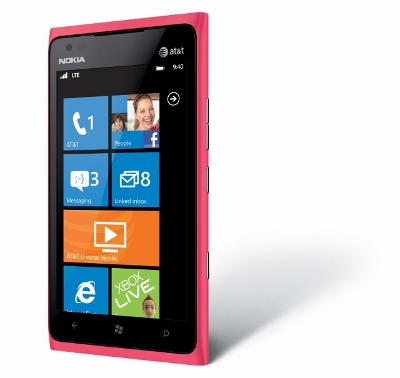


Those squares you see on the main screen of the phone are called Live Tiles.
They’re “live” because they update based on the kind of information they contain — like email messages, weather, and so forth. Since I check this site frequently, I wanted to make one for TTAJ. I’ll show you how I did it, and how easy it is for you to make one too!!
First, I just tapped the Internet Explorer tile, and typed in tatertotsandjello.com in the address box.
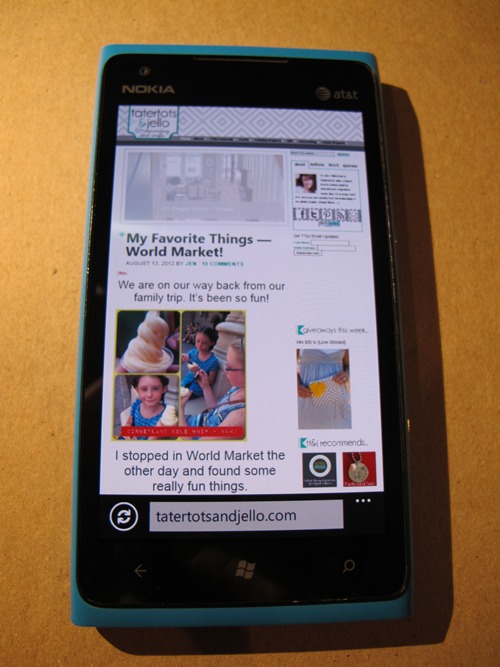
See those three dots in the bottom left? I think that like an ellipsis … they mean “more stuff.”
Tap those and you’ll see a menu like this:
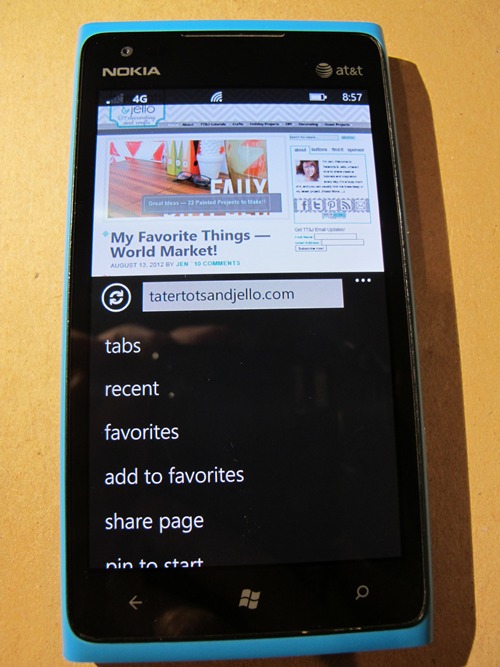
You’ll have to scroll up a bit to see the “pin to start” item, like this:
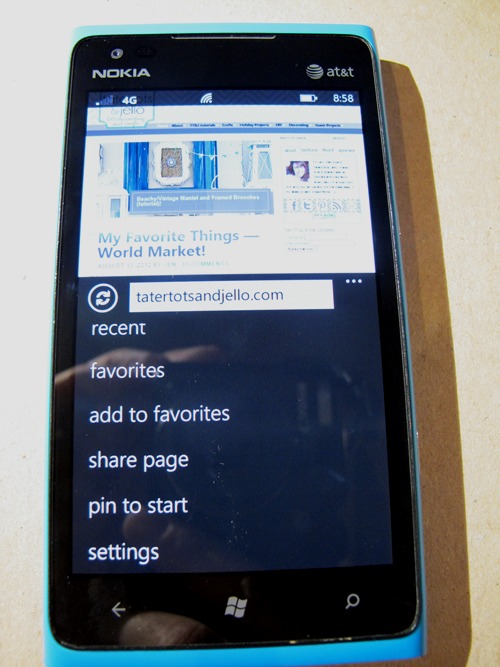
Tap “pin to start” and your web page (of course tatertotsandjello.com in this case) will appear as a Live Tile on the bottom of the main page, like this:
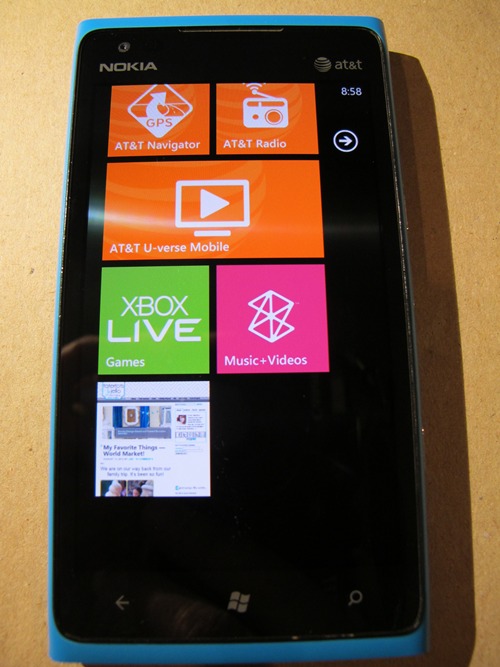
But we don’t want it there — we want it near the top! So just tap the Tile and hold it down until it looks like this:
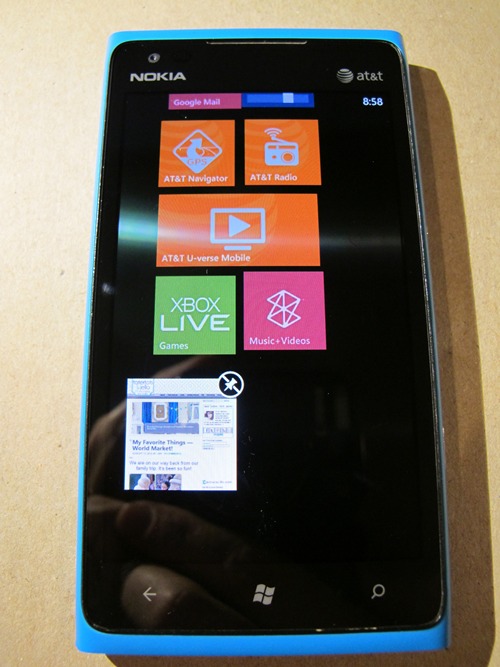
Then just tap, hold and drag the Tile where you want it — I moved it up top near my “me” tile that shows a list of all my Twitter, Facebook feeds and so forth in one place … so now it looks like this:
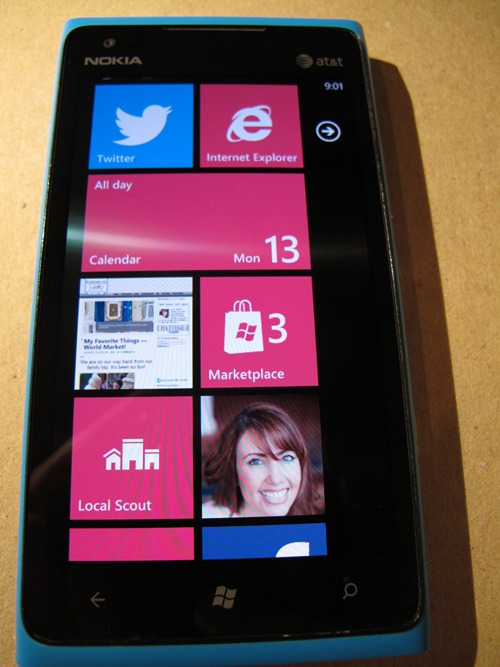
Isn’t that awesome? I love having everything I need in one place.
Even if you don’t have a Nokia Lumia 900 Windows Phone, you can try the Nokia Lumia 900 Windows Phone live demo and play with real Live Tiles yourself!
Also, you can change the colors of your tiles (and change your background colors too).
Microsoft’s site talks about how to do it — and shows some of the colors you might find on your phone, like these (image from Microsoft):

One bonus comment: one of the things I’ve loved about this phone is how easy it is to stay connected.
But one of my pet peeves about any mobile phone or tablet has been that I can’t keep the Tatertots and Jello page on Facebook updated unless I’m at my computer. A cool Windows Phone 7 app called Fanpage Manager has made it so I can finally post on the TT&J page on the road … so now I really can have it all on my phone!
* * * * *
And, one lucky reader will get a brand new, pink Nokia Lumia 900 Windows Phone for use on the AT&T network!
All you have to do is comment in the Rafflecopter widget below telling me your favorite Live Tile and why!
(And don’t forget, even if you don’t have a Nokia Lumia 900 Windows Phone,
you can try the Nokia Lumia 900 Windows Phone live demo and play with real Live Tiles yourself!)
Hurry! The giveaway ends on August 22nd!
Good luck!
xoxo
Have a Happy Day!!

The Nokia Lumia 900 Windows Phone was provided to me for review. See here for complete disclosures. Complete rules of this giveaway are here.






Hi there to every , as I am in fact keen of reading this weblog’s post to be updated on a regular basis. It carries pleasant material.
i just love the weatherbug live tile! its so great to see live weather updates without having to open an app…
I love the fb tile because it is so so fast to connect to fb
I would be interested in giving a windows phone a try
Hello Jen! I like the Calendar Tile on the Nokia Lumia 900 Phone. Since I am now officially “retired” there are days I honestly do not know what day it is, what the date is or even what time it is. I will look at my phone to check that information so an easy Live Tile would make that much easier. And, I like that a person can change colors of the tiles. Great concept! Thanks for sharing.
That is so cool. I will be needing a new phone soon and this would be so fun!!
facebook or pinterest- would be hard to choose!!
Probably Marketplace! Thanks for the chance to win!
I love the Zune Music app because I have the zune pass which is just awesome.
I like the xbox, and the skype, and also the music app is beast!
Calendar would be great… so would twitter… but dangerous! haha 🙂
I think I would like the Calendar tile the most. I hope I get to test one out for myself!
The messaging tile. I feel so out of the loop right now!
I follow you on Pinterest!!
I like the messaging tile… I’ll be able to keep up with whats going on with the social networks
The calendar tile…to keep me in line. The Instagram one as well…how does one really chose? 🙂
I really like the messaging tile, and the fact that you can go between the various services so quickly. However, the office tile is cool because you can quickly jump between lists, docs, etc. Easy to navigate!
The message tile would be my favorite… looks so easy to use! AJ@queenofmynest
Okay we have connected on Pinterest, I am following All your boards…..:) Thanks for this chance.
Maybe the message tile? so hard to choose, would love a chance to try one out…. hint hint
Love the messaging tile – and the way it helps connect you to your world!
I love the Facebook tile because I am addicted to Facebook and it makes it that much easier to connect just by being on my start page. I love pink also!
I love how accessible everything is on the new Nokia Lumia 900 Windows Phone!
Oh, Jen I love, love, LOVE, your giveaways! Thanks so much!
I think the Marketplace will be my favorite LiveTile at first. If they offer an Instagram one, I’ll be on it like white on rice!
the reader, email and pinterest–and you!
This phone looks awesome! My pink blackberry is sooo old. An easily accessed calendar tile would be great. Nothing is easy to access on my phone and the absolutely hardest thing to do is make a phone call!!
This is a great give away! Thanks!
I love the calendar tile- always keeps you on track and reminding you what is coming up… I need those reminders sometimes! Thanks for the giveaway!
AWESOME giveaway!!! Thanks!
Chances are it would be the facebook tile. Who knows? So many choices.
I am sure the Facebook tile would get a lot of action.
I would love to win this phone!
Marketplace is my current favorite…at this time of year, it really helps to find great deals. Many thanks!
My favorite Live Tile would have to be Facebook!
Love the Microsoft Office tile. You don’t normally see Office on a cell phone and I use it all the time at work. I think it would be great to be able to work on my Powerpoints on my phone.
So cute!
I have never even heard of this!! How awesome is this!! I would LOVE to win this. -Cassey
I’m loving the Marketplace tile. I’m always looking for new places to go.
Facebook. I like to be up to date in what’s going on.
That looks like a pretty cool phone. It would be awesome to win it
I’m so old school…I’ve never had a decent phone. This is like a kid in a candy store for me; I would love having a Facebook and Pinterest tiles (my two addictions). Thanks for offering the chance to win this amazing phone.
Facebook …because i love facebook 🙂 thanks for the chance
My most used live tile on my phone is probably my Facebook tile. So I suppose that makes it my favorite. But I also love to be able to check my email and I text my kids a lot when they’re gone from the house. ;D
I have to say I need the NAVIGATION or navigator!! I drive & travel very much? The car GPS always was messing up? Got rid of it? I use & need this application. if I did NOT have it? I would be in CHINA BY NOW!! Thank You for a great ~ opportunity~~
Love the pink color on this phone!! I like the office tile.
Facebook because it’s how I keep connected to me extended family all over the country.
My favorite tiles would be messaging, facebook and email….super cool phone!
Ooooooooo…..and the calendar tile…I have way too much to keep track of….I am super giddy now!!!!
Email bc I spend so much time away from my laptop when taking kids to activities.
Hmmm, how about a tie between Pinterest and Facebook!
I’d just love to be able to check FB on my phone!
Gotta be Facebook for now.
I need a new phone, like YESTERDAY!
Email would be fabulous!
YAY for having a TT&J tile! i love that idea. i think i would like the calendar & all social media tiles.
kellie
Wow! What an incredible giveaway! I think the Pinterest tile would probably be my favorite. Can’t get enough Pinterest! Thanks for the chance to win!
I love it! You made this phone sound so great and I love PINK!
Jen you did a fabulous job with this! Your so savvy! I love the TT&J tile! So smart!
I love how it is cute and organized! I am looking for a new phone, this might be a great addition to my purse! 🙂 I would say that it would have to be the FB tile or my blog. Thanks.
Love the color
Favorite live tile is the xbox live tile.
awesome phone
The radio one looks neat, but they all do.
It would be between the Facebook or messaging ones.
I love that you can organize a tile to just be my family. It would really help organize my phone!
Thatd be awesome
Facebook and Email would be the most used tile for me. Such an awesome phone!
Is there a tile to help you tell the difference between left and right?
My favorite Live Tile is certainly for the WPCentral app, keeping me up to date on all the WP happenings. Thanks!
I love my windows phone, and I’ve been wanting to upgrade…my fav tiles are messaging, email, facebook….the list goes on.
I would, hands down, favor an Instagram live tile if they have it! If not, Facebook would be my live tile of choice. Instagram is a beautiful way to see the world – and FB is becoming the best way to catch up with everyone you’ve known from the past 20 years! 🙂
Facebook.. i think it would use it the most!
The Facebook!! Gotta be keeping connected! the colors are all great, and I like pink!
photos tile – love it!
AH i would love a pink phone!
the facebook, and the email would, be the most useful to me! And I have AtandT. My phone probably 4 years old now. And it drops calls ALL THE TIME! Would love to win this phone, and I love pink! 🙂
the facebook tile would be my most used tile. i like the simple, elegant design and layout the window phones offer.
i’d love to give a Windows Phone a try one more time 🙂
The good old fashioned messaging tile would probably be the most useful. Although, I have a feeling I’d definitely appreciate a Pinterest one as well. 🙂
I would love the email tile, I have an old phone!
Ohhhhh how AWESOME…would love to use Pinterest on my new one!!! 🙂 Thanks for the chance!!
I am in dire need of a new phone to bling out and this one sounds perfect! My favorite tile is the calendar because I need reminders about who, what, where, and when – daily!
My favorite live tile would be Pinterest! I am always getting on and checking out new things, or if I am at the store would like to be able to look up something I pinned to make sure I have what I need! This phone would be great!
Facebook and Pinterest!Looks like a great phone.
Pinterest!!! 🙂
Pinterest! Love it!
I’m sure Internet Explorer would be mine- Hotmail and FB would be the specifics.
Hard to choose between pintrest (which I am addicted) and facebook to keep up with family and friends
Pinterest tile for sure!
I think I would like the ATT navigator tile. As my fiance always tells me, I am directionally challenged!
A pink phone!??!?!?! I want it!!!
I’d really love to win!! Pinterest tile!!
Facebook and pinterest!!!
facebook and calendar tiles for sure! thanks for the great offer!!!
It would probably be email tile.
The Pinterest tile!
I would tile Calendar to keep up with my family’s schedule and Facebook to keep up with blogs and friends!
Wow, very sharp phone. All the tiles are so useful. Thanks for the opportunity to enter.
I love the att navigator tile because I am forever getting lost 🙂
I would love the map tile!!
I really like the idea of the map tile – to pin my start place would be helpful with traveling for my job. 🙂
I know I would have FB and Pinterest because I love both sites.
I think I would love the Xbox Live Tile, I love games!
Facebook, Pinterest, Etsy, too many to name:)
this sounds awesome!
definitely the calendar tile with all the kids’ schedules!
WOW! What a cool toy!
I love the calendar tile! I want a smart phone so badly!
This Phone looks amazing. I love hearing from real people who really use their phone what they think before buying.
I need a new phone for sure…my babysitter referred to mine as “the dinosaur”
Oops! Forgot fav tile…Internet Explorer
Weather tile and a calendar would be great!
I love the internet explorer tile!
What a great giveaway! Finally a phone my husband wouldn’t steal when he breaks his (only because its pink… and even then I might not put it past him)!
I would love having a Google Reader tile to be able to read my favorite blogs from my phone rather than being stuck in front of the computer. 🙂
Oooh I love pink and would love to win!!!
I am not sure what their tiles exactly are, but the ones you mentioned sure look good. Also, the Fanpage Manager sounds pretty awesome, since on my current phone I can only manage my personal profile only.
What a great giveaway! My fav would have to be a toss up between facebook and twitter. Love your blog 🙂
Pinterest would be my go-to fav!
I think I would put my email carrier as my favorite tile since I like to have easy access to it – that is the way my children’s teachers communicate with me. Facebook would be a close 2nd!
Facebook – definitely cause I use it the most.
I like the idea of having twitter and facebook tiles on the main screen. That way, I won’t miss anything.
Facebook is a first with Pinterest coming a close second!!
Facebook keeps me connected to all the lovely blogs I follow!!
Facebook tile for sure!!
Facebook….I am always on Facebook.
Not sure on a favorite, this all new to me. Great giveaway!!
It would be my Facebook Tile…with a 16 month old keeping me super busy, this tile will keep me updated and in touch w/all my friends & family. LOVE that I can customize it w/color too!
I would love the Calendar or FB tiles so I can stay organized and keep in touch with friends on the go!
LUV the option to make any website a live tile!! That is sooo cool!!
I love the people tiles since they tell you everything about that person!
What a cool phone! Great prize!!! 🙂
alarms live tile is my favorite because it helps me remember to do things.
Facebook and Pinterest AND the calender tile! I need all the help I can get! 🙂
The Tiles ides is great. I like the that words look bigger too in the Favorites, It is hard to read the smaller print 🙂
The option to make your blog a tile right on the home screen is so neat!!! Most phones have where you can add it to your favorite sites or what not, but an actual button right there, up front makes it easily accessible! Love that!
Pinterest would be at the top of my tile list. Since my mom’s phone just died. I would give it to her. Thanks for the opportunity to win
Definitely pinterest. I can’t stop pinning!
Redrover!
Facebook!
Faceboo and pinterest….my daily addictions.
I would love it for my favorite Blogs like Tater Tots and Jello and Keeping connected with Facebook and Pinterest as well.
Facebook tile!
I am Instagram addicted, so if Instagram is a tile option – that would be my fave 🙂
Id use it for blogging!
Awesome!! Pinterest is my fave!!!! Love it and what a cool phone!! I hoep I win! Hugs, Dannette
I would use it for Pinterest and keeping up with my favorite blogs.
probably facebook and pintrest…LOVE THEM!
Would definitely have a facebook tile
I would be interested to see Pinterest tile, but I don’t have this phone (yet 🙂 ), so don’t know how the tiles work
Facebook of course! And pinterest!!
I don’t have a smart phone – so everything
I like how simple the IE tile is… I always hate having to work hard to get to my web browser on my phone….
I love the calendar tile! Great to have something on hand to help keep my family organized!
And I love the facebook tile, pinterest, email, all of it! What an amazing giveaway! Thank you!
Pinterest, without a doubt!
Definitely the Pinterest tile!!
normally i would say facebook. but if i can read my blogs from it that would be amazing
a pink calendar/email/phone! What is not to love?!
I would probably use all of the tiles, but the facebook, pinterest, and calendar tiles would be the most useful in keeping up to date with my life!
I think the ‘me’ tile as you called it would be awesome! To have my Fb, pinterest, twitter all there, on my fingertips! Awesome giveaway. I’m looking for a new phone and this one sounds really cool. Thanks! I hope I get to win it!
Thanks for the giveaway! I would probably use Facebook & Pintrest the most! Its how I stay connected 🙂
I would use the calendar, by far, the most. My son has had medical issues almost since birth and has to meet with three doctors, a case worker, and a therapist on a regular basis. My husband and I also work full time. So to keep us all on schedule I have to have a very updated and easy to access calendar! I love that this phone has it available on the front page instead of having to dig for it.
this is a great phone and one I can recommend to just about anyone. Would I recommend moving from iPhone to WP7, maybe, maybe not. Depends on how much you like the iPhone. The iPhone is a great phone, no denying that but for me, I prefer a larger screen, and until the iPhone 5 comes out with a larger screen, its just not for me. Would I recommend moving from an Android device to WP7 — absolutely. Give it a try and you might like it better. Android has its strengths, but WP7 is more polished and faster and just works better.
I would probably like Facebook and Twitter the most because I use those a lot!
I love the pink color (my favorite)…i would mostly use it for facebook, email, web browsing (pinterest)…apps for my son. 😉
I would like to have “Internet Explorer” tile….so I can get any information any time! Thanks.
I like the U-Verse tile so you can watch tv from the home screen.
I think Facebook or email would be my favorites since those are two of the main things I do with my phone. Oh, it would be so incredible to have this phone!
My favorite would probably be my email. I have to check it so often!
I think the facebook app would be my favorite. It keeps me connected and I don’t have to go checking status’s! It would be right there at my fingertips!
Tatertotsandjello of course! I would love to have my blogger dashboard as a live tile to keep my updated on all the blogs I’m am following.
IE to browse at my fingertips!
I woudl say the facebook tile because it keeps me updated
I love the calendar tile.
I’m too functional, maybe, but I love the calendar option that syncs with all my calendars…even my husbands! Saves so much grief!
I have a different windows phone and can’t wait to upgrade to the lumia! My favorite tiles are the calendar tile (I can see mine and my husband’s events at a glance), the weather.com tile (gives me the update current temp) and the wordament tile (i’m addicted to that game!).
I would use the calendar tile and the reader tile the most– one to keep me on task and the other to do the opposite!
Great Phone!!!
I would love the weather tile – and the phone – we really need to upgrade around here!
I would so tile my google reader! I’d love this phone!
Hands down, the TT&J tile so I could wow everybody at work with creative projects for our children’s ministry!
Would love to have one with all my favorite sites as a tile!
love, I want one!! thanks for the awesome change at the giveaway.
Twitter! Suspended my Facebook two weeks ago and now use Twitter. Life is better without Facebook.
I would LOVE to have different sites as tiles, like Pinterest!
I would have to say the email tile. Love that!
I would use the email tile the most. I just get so many emails every day!
The email tile! I would love to have this phone!
The email tile I would think. or no no no, can I put google reader as a tile? THAT would be it. or ummmm the FB. or the um, oh heck – do I have to choose just one???
Sad to say I would probably use the facebook tile the most.. but like being connected to email also!
I think I would love a Reader or FB the most, because that’s how I stay connected!
That looks awesome!
The people tile because I don’t have to go to multiple places to see what my friends are doing
My favorite live tile would probably be Facebook!
Being able to have web pages as a file would be my favorite part!!
I’m sure I would use the Facebook tile the most. I just can’t leave it alone.
I would love to use the google reader! Thanks so much for the chance to win this awesome phone!
This phone is awesome! I would love to win it!
The Internet tile..so I can read blogs!
I would love to have my Facebook available to me– I have a junkity old junk phone right now 🙂
Probably the email tile. Right now I don’t have email on my phone – I know – dark ages!
I desperately need a new phone. I think this would be perfect!
My favorite would have to be facebook. I can’t help but check it all day long!
The facebook tile would be hard to leave alone! 🙂 I might never get anything done all day with a cool phone with apps like that! 😉 Thanks for the chance to win!
The FB tile, easy access! My Husband has this phone and loves it.
This would be so fun!!
I would probably like the People tile the most. I have a jurassic phone and am way overdue for an update.
I would use fb a lot or reader!
If it’s anything like my computer, the Facebook tile would end up as my favorite.
I have my fingers crossed! Think I’m the last person alive under 80 who doesn’t have a cell phone. 😉
Not sure which live tile would be my favorite…..I just love how customizable it is.
This looks like such a great phone,. would love to win.